# Strange retraction behavior on Ender 3 v2
**URL:** https://marlin.crc.id.au/forum/t/strange-retraction-behavior-on-ender-3-v2/1060
**Category:** Bug Reports
**Tags:** ender-3-v2
**Created:** [6 August 2022 17:47 UTC](https://marlin.crc.id.au/forum/t/strange-retraction-behavior-on-ender-3-v2/1060 "2022-08-06T17:47:30Z")
**Posts on this page:** 4
**Page:** 1
### Author:  [@JVBR](https://marlin.crc.id.au/forum/u/JVBR)
#### Post date: [6 August 2022 17:47 UTC](https://marlin.crc.id.au/forum/t/strange-retraction-behavior-on-ender-3-v2/1060/1 "2022-08-06T17:47:30Z")
Hello,
after upgrade to Marlin version 2.1.x (Ender3-V2-BLTouch-20220806.bin) in my Ender 3 v2, retraction is behaving strangely.
I try a lot of things, using pre-build firmware in Marlin Firmware Service (paid version), built a custom firmware disabling Linear Advance, Firmware Retraction and Meatpack, but the bug continue.
I`m using a Cura and not modify any settings after upgrade firmware.
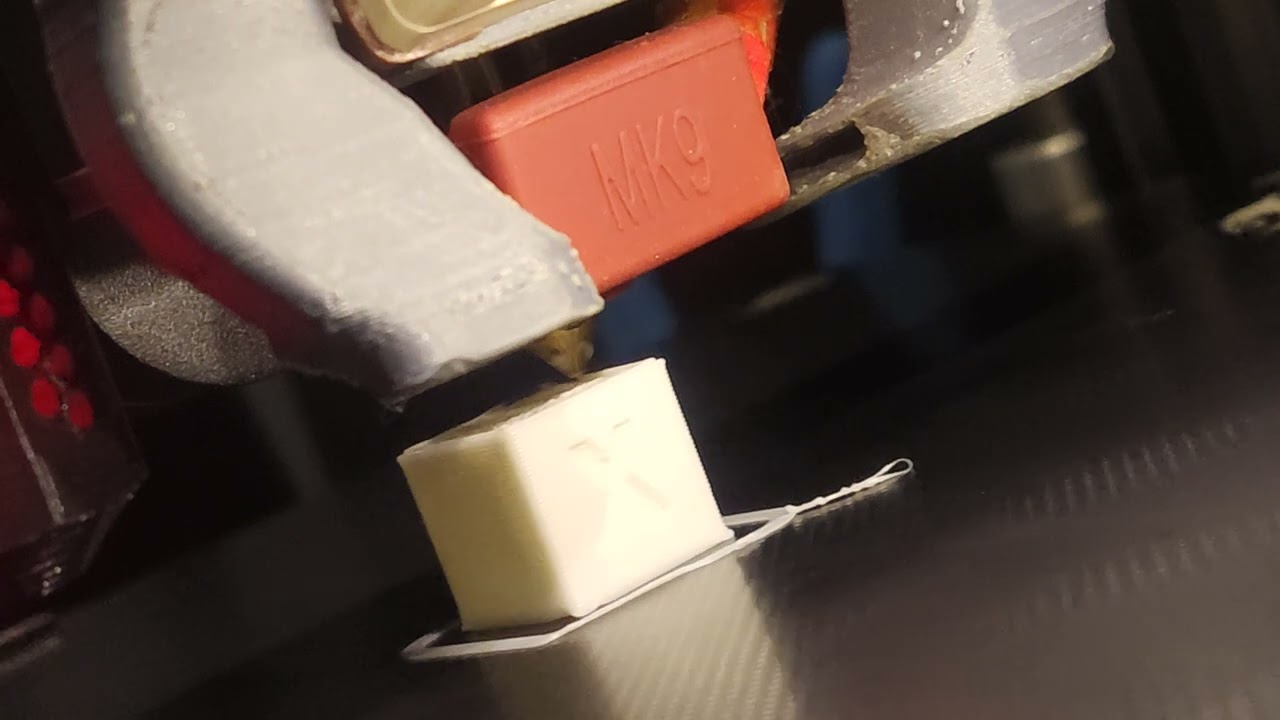
**Retraction take a long of time and have duplicated movements and strangely behavior, see video:**
[ ](https://www.youtube.com/watch?v=4oyjgjOf9HE)
**My calibration cube g-code, generated by Cura:**
> **[calibration-cube.gcode](https://drive.google.com/file/d/1Y9qObb9zp69XtNMwor9w32rBhZzDM-O2/edit)**
>
> Google Drive file.
**My current start g-code:**
```auto
; Script based on an original created by tjjfvi (https://github.com/tjjfvi)
; An up-to-date version of the tjjfvi's original script can be found
; here: https://csi.t6.fyi/
; Note - This script will only work in Cura V4.2 and above!
; --- Global Settings
; layer_height = {layer_height}
; smooth_spiralized_contours = {smooth_spiralized_contours}
; magic_mesh_surface_mode = {magic_mesh_surface_mode}
; machine_extruder_count = {machine_extruder_count}
; --- Single Extruder Settings
; speed_z_hop = {speed_z_hop}
; retraction_amount = {retraction_amount}
; retraction_hop = {retraction_hop}
; retraction_hop_enabled = {retraction_hop_enabled}
; retraction_enable = {retraction_enable}
; retraction_speed = {retraction_speed}
; retraction_retract_speed = {retraction_retract_speed}
; retraction_prime_speed = {retraction_prime_speed}
; speed_travel = {speed_travel}
; Ender 3 Custom Start G-code
M117 Bed up to temp
M140 S{material_bed_temperature_layer_0} ; Set Heat Bed temperature
M190 S{material_bed_temperature_layer_0} ; Wait for Heat Bed temperature
M117 Pre-heating extruder
M104 S{material_print_temperature_layer_0} ; Set Extruder temperature
G28 ; Home all axes
M117 Auto bed-level
G29 0; Auto bed-level (BL-Touch)
G92 E0 ; Reset Extruder
M117 Wating extruder temp
M109 S{material_print_temperature_layer_0} ; Wait for Extruder temperature
G1 Z1.0 F3000 ; move z up little to prevent scratching of surface
G1 X0.1 Y20 Z0.3 F5000.0 ; move to start-line position
M117 Prime hotend started
G1 X0.1 Y200.0 Z0.3 F1500.0 E15 ; draw 1st line
G1 X0.4 Y200.0 Z0.3 F5000.0 ; move to side a little
G1 X0.4 Y20 Z0.3 F1500.0 E30 ; draw 2nd line
G92 E0 ; reset extruder
G1 Z1.0 F3000 ; move z up little to prevent scratching of surface
M117 Print started
; End of custom start GCode
```
---
### Author:  [@CRCinAU](https://marlin.crc.id.au/forum/u/CRCinAU)
#### Post date: [7 August 2022 02:12 UTC](https://marlin.crc.id.au/forum/t/strange-retraction-behavior-on-ender-3-v2/1060/2 "2022-08-07T02:12:41Z")
I haven’t been able to reproduce this, nor seen any other reports of it - but I have a couple of suggestions:
1. Try to disable linear advance via: `M900 K0`
2. Make sure your slicer isn’t set to use hardware retraction
It looks like your retraction is being set to 6mm - which might well be excessive.
A layer height of 0.32mm won’t be doing you much either - as if you only have the stock 0.4mm nozzle, this is really pushing the limits…
---
### Author:  [@JVBR](https://marlin.crc.id.au/forum/u/JVBR)
#### Post date: [8 August 2022 20:58 UTC](https://marlin.crc.id.au/forum/t/strange-retraction-behavior-on-ender-3-v2/1060/3 "2022-08-08T20:58:19Z")
I try to use `M900 K0` without success.
With firmware-retraction works fine, but I want to use slicer retraction, have more features and is more easy to use.
I try too compile v2.1.1 version with firmware-retraction enable too, put zero in all firmware-retraction codes `M208` and `M207` and disable firmware-retraction in slicer, but not work.
My firmware codes:
[https://drive.google.com/drive/folders/1PIqez62yKWW60lRmoG\_nDRWTuX4JqjuB?usp=sharing](https://drive.google.com/drive/folders/1PIqez62yKWW60lRmoG_nDRWTuX4JqjuB?usp=sharing)
---
### Author:  [@CRCinAU](https://marlin.crc.id.au/forum/u/CRCinAU)
#### Post date: [9 August 2022 11:00 UTC](https://marlin.crc.id.au/forum/t/strange-retraction-behavior-on-ender-3-v2/1060/4 "2022-08-09T11:00:06Z")
Interesting. I’m not sure if this is you, but there seems to be an issue logged about something possibly similar:
>
>
> \### Did you test the latest \`bugfix-2.1.x\` code?
>
> Yes, and the problem still e…xists.
>
> \### Bug Description
>
> When I try to use slicer retraction (CUra) and a lot of duplicated moves appear.
>
> I try too compile v2.1.1 version with firmware-retraction enable, put zero in all firmware-retraction codes M208 and M207 and disable firmware-retraction in slicer, but not work.
>
> With firmware-retraction enable, works fine, but I want to use slicer retraction.
>
> \### Bug Timeline
>
> new bug
>
> \### Expected behavior
>
> Use slicer retraction without duplicated moviments.
>
> \### Actual behavior
>
> \_No response\_
>
> \### Steps to Reproduce
>
> 1. Disable firmware-retraction in slicer (Cura).
> 2. Try to use slicer retraction.
> 3. Print anyone model.
>
> \### Version of Marlin Firmware
>
> 2.1.1
>
> \### Printer model
>
> Creality Ender 3 v2 4.2.2
>
> \### Electronics
>
> Not
>
> \### Add-ons
>
> Not
>
> \### Bed Leveling
>
> \_No response\_
>
> \### Your Slicer
>
> Cura
>
> \### Host Software
>
> OctoPrint
>
> \### Don't forget to include
>
> \- \[X\] A ZIP file containing your \`Configuration.h\` and \`Configuration\_adv.h\`.
>
> \### Additional information & file uploads
>
> Video with bug:
> https://www.youtube.com/watch?v=4oyjgjOf9HE&t
>
> My gcode:
> https://drive.google.com/file/d/1Y9qObb9zp69XtNMwor9w32rBhZzDM-O2
>
> My firmware codes:
> https://drive.google.com/drive/folders/1PIqez62yKWW60lRmoG\_nDRWTuX4JqjuB?usp=sharing
>
> My start script:
> \`\`\`
> ; Script based on an original created by tjjfvi (https://github.com/tjjfvi)
> ; An up-to-date version of the tjjfvi's original script can be found
> ; here: https://csi.t6.fyi/
> ; Note - This script will only work in Cura V4.2 and above!
> ; --- Global Settings
> ; layer\_height = {layer\_height}
> ; smooth\_spiralized\_contours = {smooth\_spiralized\_contours}
> ; magic\_mesh\_surface\_mode = {magic\_mesh\_surface\_mode}
> ; machine\_extruder\_count = {machine\_extruder\_count}
> ; --- Single Extruder Settings
> ; speed\_z\_hop = {speed\_z\_hop}
> ; retraction\_amount = {retraction\_amount}
> ; retraction\_hop = {retraction\_hop}
> ; retraction\_hop\_enabled = {retraction\_hop\_enabled}
> ; retraction\_enable = {retraction\_enable}
> ; retraction\_speed = {retraction\_speed}
> ; retraction\_retract\_speed = {retraction\_retract\_speed}
> ; retraction\_prime\_speed = {retraction\_prime\_speed}
> ; speed\_travel = {speed\_travel}
>
> ; Ender 3 Custom Start G-code
> M117 Bed up to temp
> M140 S{material\_bed\_temperature\_layer\_0} ; Set Heat Bed temperature
> M190 S{material\_bed\_temperature\_layer\_0} ; Wait for Heat Bed temperature
> M117 Pre-heating extruder
> M104 S{material\_print\_temperature\_layer\_0} ; Set Extruder temperature
> G28 ; Home all axes
> M117 Auto bed-level
> ; G29 0; Auto bed-level (BL-Touch)
> G92 E0 ; Reset Extruder
> M117 Wating extruder temp
> M109 S{material\_print\_temperature\_layer\_0} ; Wait for Extruder temperature
>
> M900 K0
> M209 S0
>
> G1 Z1.0 F3000 ; move z up little to prevent scratching of surface
> G1 X0.1 Y20 Z0.3 F5000.0 ; move to start-line position
> M117 Prime hotend started
> G1 X0.1 Y200.0 Z0.3 F1500.0 E15 ; draw 1st line
> G1 X0.4 Y200.0 Z0.3 F5000.0 ; move to side a little
> G1 X0.4 Y20 Z0.3 F1500.0 E30 ; draw 2nd line
> G92 E0 ; reset extruder
> G1 Z1.0 F3000 ; move z up little to prevent scratching of surface
> M117 Print started
> ; End of custom start GCode
> \`\`\`
EDIT: Scratch that - I just noticed that you’re the same person - as the google drive links are the same 😃
Interestingly, in the G-Code you generated, there are no retractions at all the from the slicer.
It is doing wipes, as such:
```auto
G1 X106.1 Y106.1 E13.78001
G1 X118.9 Y106.1 E14.24831
G1 X118.9 Y118.9 E14.71661
```
I wonder if you could re-slice with the extruder set to relative instead of absolute so it’d be a bit clearer in what its generating?